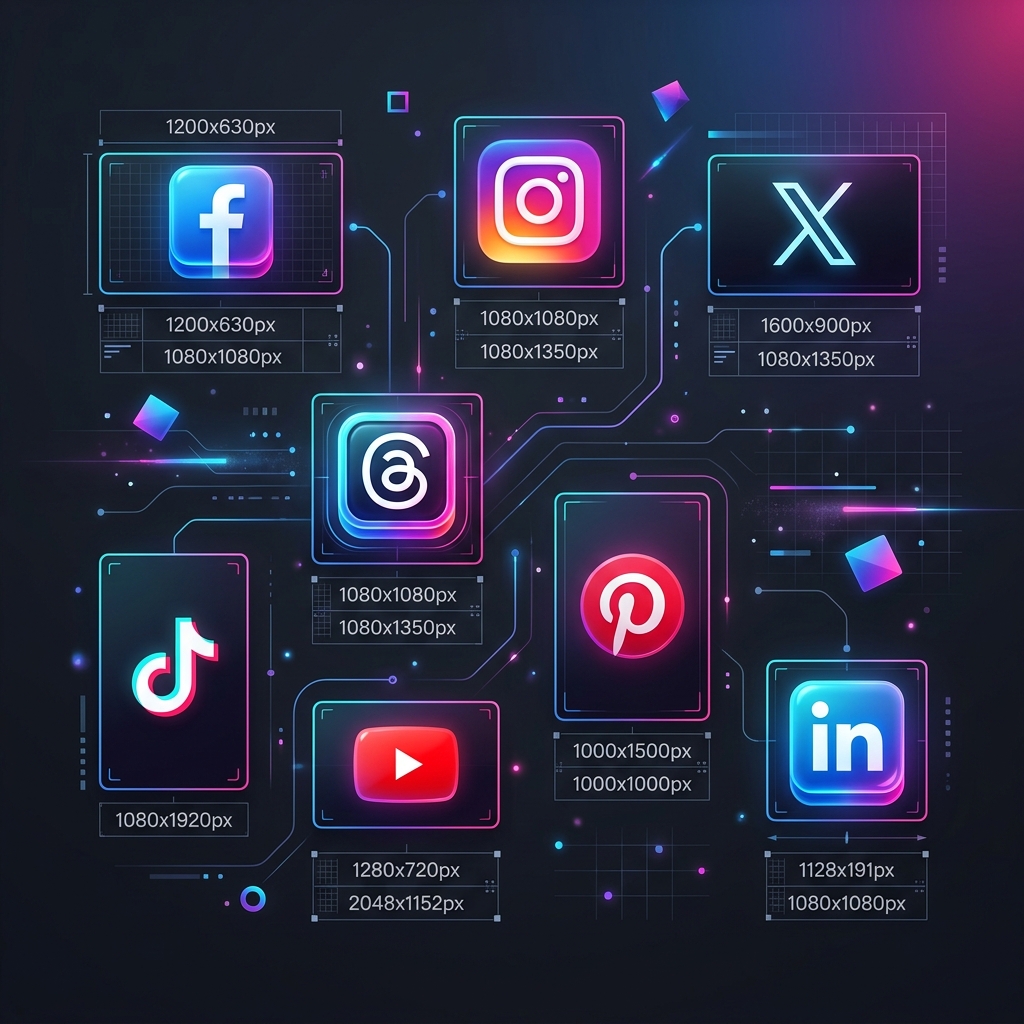
Visual content dominates the digital landscape. A blurry header image or poorly cropped profile picture can instantly ruin your brand's credibility. Knowing the correct social media image sizes for each platform is essential for creating a professional online presence. Using AI tools for content creation can speed up this process and ensure your visuals are always high quality. With nine major networks constantly updating their algorithms and layouts, staying current on image dimensions can feel like a full-time job.
Different platforms serve different purposes. A portrait photo that looks perfect on Instagram Stories might be completely cut off in a Twitter feed. Understanding what navigation mean on Instagram Stories helps you avoid placing text where app UI might cover it. Using the right aspect ratios ensures your content looks exactly as intended, leading to better engagement, more clicks, and a polished brand aesthetic. This guide provides the most up-to-date image dimensions for the top nine social media platforms in 2026.
- Always use PNG for graphics and logos to avoid compression artifacts.
- JPG is best for photographs to keep file sizes manageable while retaining quality.
- Square (1:1) and vertical (9:16) are the most versatile formats across platforms today.
- Keep important text centered in cover photos to ensure it remains visible on mobile devices.
- Check mobile previews before finalizing any profile or header image updates.
1. Facebook Image Sizes
Facebook remains a powerhouse for both personal networking and business marketing. The platform frequently tweaks its layout, but the core image dimensions have stabilized. Since many users access Facebook via the mobile app, optimizing for smaller screens is critical. Knowing the best time to post on Facebook is also key to ensuring your perfectly sized images get the eyes they deserve.
Because Facebook crops cover photos differently on desktop and mobile, keep all crucial information (text, logos) within the "safe zone" in the center of the image. Leave the outer edges free of important details.
2. Instagram Image Sizes
Instagram is inherently visual. Quality is everything on this platform. While it started as a square-only app, it now supports landscape and portrait orientations. Aligning your high-quality visuals with the best times to post on Instagram ensures that your pixel-perfect content reaches your audience when they are most active. Portrait (vertical) images are highly recommended because they take up more screen real estate as users scroll.
Always opt for 1080 x 1350 pixels (4:5 ratio) for standard feed posts. This size occupies the maximum amount of space on a mobile screen. Combine these visuals with an Instagram caption generator to create a complete, high-engagement post.
3. Twitter (X) Image Sizes
Twitter, now widely known as X, moves fast. Images are a proven way to stop the scroll and increase engagement on your posts. Mastering how to use X (formerly Twitter) includes knowing how the platform crops images in its fast-moving feed to ensure your message isn't lost.
4. LinkedIn Image Sizes
LinkedIn is the premier network for professionals. Your imagery here should reflect your professional brand or company identity. Blurry logos or poorly cropped headshots can negatively impact your professional reputation.
False. The 1128 x 191 dimension is very specific. Using an incorrect size will force LinkedIn to stretch or aggressively crop your image, often cutting out your company name or tagline.
5. Pinterest Image Sizes
Pinterest operates as a visual search engine. Unlike other platforms where content moves quickly down a feed, Pinterest Pins have a very long lifespan. Vertical pins are mandatory here; horizontal pins look tiny and get lost in the grid.
6. YouTube Image Sizes
YouTube is the second largest search engine globally. While the focus is heavily on video, the static images you use for your channel art and video thumbnails play a massive role in attracting viewers. Aspiring creators often research how much YouTube pays per view when building their strategy, but the first step is always getting the click through great design.
Your thumbnail is arguably more important than your title. Always use 1280 x 720 pixels (16:9 ratio) for video thumbnails. A YouTube title generator can then help you craft the perfect headline to match your stunning visual. Ensure the file size is under 2MB and saved as a JPG, GIF, or PNG.
7. TikTok Image Sizes
TikTok is a mobile-first video platform, but images still matter for your profile and the newer photo carousel features. Identifying the best time to post on TikTok is crucial for video reach, and using a TikTok caption generator can help your photo carousels resonate with the community.
8. Snapchat Image Sizes
Snapchat pioneered the vertical, ephemeral content format. If you are creating Geofilters or running ads on the platform, precise dimensions are required for approval.
All Snapchat content (Snaps, Ads, Stories, and Geofilters) uses the exact same size: 1080 x 1920 pixels (9:16 ratio). While you focus on the visuals, many users are curious about how the Snapchat score works as they increase their activity on the app. Keep a 150-pixel buffer at the top and bottom free of text.
9. Threads Image Sizes
Threads, Meta's text-based app, integrates closely with Instagram. However, its feed behaves more like Twitter. As new platforms emerge, staying informed on what is Bluesky and other alternatives can help you decide where to focus your visual branding.
Why Visual Consistency Matters
Beyond just looking good, maintaining consistent image sizes across all your channels builds a cohesive brand identity. When your audience sees a perfectly formatted post, they subconciously associate it with quality and reliability.
Consistent layouts and high-quality visuals make your content instantly recognizable in a crowded feed, building long-term trust.
Properly sized images ensure that no critical information is hidden by mobile interfaces or cut off by desktop crops across different devices.
Platforms like Instagram and Pinterest favor high-quality, correctly formatted content, often giving it a slight boost in search visibility.
Pixel-perfect content signals that you care about your audience's experience and your own brand's reputation in a competitive market.
Frequently Asked Questions
Blurriness usually occurs when you upload an image that is smaller than the recommended size, forcing the platform to stretch it. It can also happen if your file size is too large, triggering heavy automatic compression. Sticking to the exact recommended pixel dimensions helps prevent this.
Use PNG files for graphics, logos, and images with text, as PNG handles flat colors and sharp lines better. Use JPG files for photographs to keep file sizes smaller without sacrificing noticeable quality.
If you must use a single size across all platforms, a 1080 x 1080 pixel square is the safest bet. It works perfectly on Instagram and displays reasonably well on Facebook, LinkedIn, and Twitter without awkward cropping.
- File Format: Use PNG for graphics with text or transparent backgrounds; use JPG for high-detail photographs.
- Color Space: Always export in sRGB to ensure colors display accurately across different devices and browsers.
- Compression: Keep file sizes under 1MB where possible to prevent the platform from applying aggressive, quality-reducing compression.
- Safe Zones: Ensure text and logos are centered to avoid being cropped out on mobile devices or covered by app UI elements.
- Aspect Ratio: Focus on 9:16 for stories and reels, and 4:5 for feed posts to maximize screen real estate.
Final Thoughts on Image Optimization
Keeping track of every image size across nine different platforms is challenging, but it is a necessary part of modern digital marketing. A well-formatted image demonstrates professionalism and attention to detail.

Priyanka Kumari
Priyanka Kumari is a digital strategist and content creator who focuses on how we work. She has spent years testing the latest tech to find what truly helps people work better, not just faster. When she is not testing apps, she is likely reading a book or walking a new trail.
Read more articles by this author